

Spellbrand Blog
Vector Graphics and Raster Graphics Difference

Looking for a custom logo?
Get a professional, one-of-a-kind logo designed by a founder-led studio.
Looking for a custom logo design?
Our professional designers create unique, memorable logos tailored to your brand.
See Our Logo Design Services →Word processors and spreadsheet or presentation applications, although suitable for creating files for office or Internet use, are not recommended for creating digital art for print. Microsoft Office applications are included in this group. In some cases, however, such files may be converted so as to enable use.
Here are 2 examples of an image when magnified or scaled up. You will notice the difference in clarity. The mascot design below was designed by SpellBrand for a client.


Vector Graphics typically are generated using drawing or illustration programs (e.g., Adobe Illustrator) and are composed of mathematically-defined geometric shapes—lines, objects and fills. Since vectors entail both magnitude and direction, vector elements thus are comprised of line segments whose length represents magnitude and whose orientation in space represents direction.
Vector graphics usually are easily modified within the creating application and generally are not affected detrimentally by scaling (enlarging or reducing their size). Because vector elements are mathematically-defined, scaling simply requires modification of their mathematical locations. However, vector files do not support photographic imagery well and often can be problematic for cross-platform exchange. Vector graphics typically are saved as EPS format.
This makes vector graphics ideal for logo design. Creating a vector logo is more difficult but the effort pays for itself when the vector logo file is sent to printers or sign makers etc. The vector logo can be scaled up or down with out losing quality and would enable smooth transition between various media.

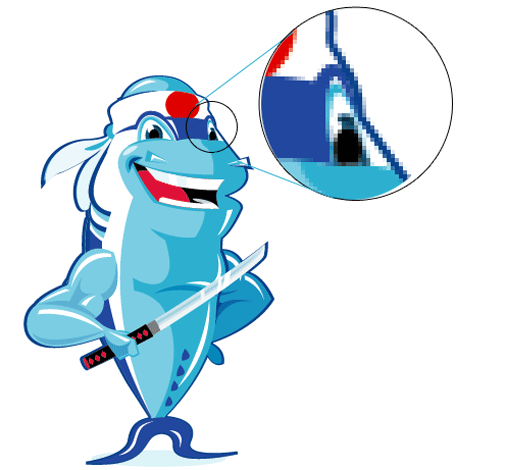 Raster Graphic Images are produced by digital image capture devices: digital scanners or digital cameras, or by pixel editing programs (e.g., Adobe Photoshop). Raster images are composed of a matrix (grid) or bitmap of digital picture elements (pixels). Pixels are squares or rectangles described as black, white, gray or color. Raster images typically are saved as TIFF format, but can be saved as EPS as well.
Whereas conversion from vector to raster is easily accomplished, raster conversion to vector is much more difficult (and often is not possible). Raster images typically are easily shared across various platforms, but can be more difficult than vector graphics to modify. As well, raster graphics are impacted by scaling.
Creating a raster logo design using Adobe Photoshop might be ideal for web only usage but if you are serious about branding, then the resulting raster PSD logo file will be of limited use. When sent to a printer or sign maker and when they try to scale the raster logo, the quality deteriorates and pixellation occurs. Yes, agreed, creating the raster logo design in Photoshop would enable a designer to pile on stunning effects (such as drop shadows, beveling, blurring etc). But the final deliverable will have limited uses.
Read more about different image file formats. Here is an indepth explanation of vector graphics.
Vector and Raster File Extensions
Extension
File Application
Vector
Raster
.86v
TI-86 vector file


.ai
Adobe Illustrator graphics


.ait
Adobe Illustrator template


.art
Adobe Illustrator graphics


.cdl
SignLab vector graphic file


.cdr
CorelDRAW vector image


.cdrw
Corel Draw file


.cdt
CorelDRAW Template


.cgm
Computer graphics metafile


.cht
Harvard Graphics vector file


.cit
SeeYou vector maps


.csh
Adobe Photoshop shape


.csl
Corel symbol library


.ctn
Cadterns Sloper File


.ddoc
Apple MacDraw vector graphic file


.dlg
Digital Line Graph vector image


.do
Digital Line Graph optional vector data


.drw
Vector file


.dvg
GraphicsWorks vector drawing


.dxb
AutoCAD drawing exchange format


.emb
Orchida Embroidery System embroidery pattern


.fh
image file


.fh10
Adobe FreeHand 10 drawing file


.gcd
Generic CADD Drawing format (vector)


.gem
Ventura Publisher GEM vector picture


.gl2
HP Graphics Language plotter file


.hpg
Vector image (HP Graphics Language plotter file)


.hpgl
Hewlett Packard Graphics Language plot file


.ima
EGO – Chart – Autumn Mirage vector graphics


.md
Mayura Draw vector drawing file


.mvg
ImageMagick proprietary vector graphics format


.odg
OpenOffice Draw graphic file


.pat
Corel vector pattern


.pat
Pattern Maker Cross-Stitch Pattern File


.pat
Polygon Attribute Table File


.pat
Corel Paint Shop Pro Pattern Image File


.pat
PCStitch Pattern File


.pat
Smash Simulator Test Pattern File


.pat
Cadterns Sloper File


.pat
Orchida Embroidery System File


.pct
Apple Macintosh QuickDraw/PICT bitmap graphics format


.pif
Vector image GDF format


.pix
Image Systems vector


.pix
Inset Systems raster & vector format


.plo
HP Graphics Language plotter file


.plot
Vector graphics


.plt
Autodesk AutoCAD HPGL vector graphic plotter file


.ps
Adobe PostScript file


.sdw
Amidraw vector image


.sdw
WordPro drawing


.slddwg
SolidWorks drawing 2D vector graphics file


.sp
SignPlot output format


.spa
FutureSplash Movie (Adobe Flash)


.svf
Simple Vector Format


.svg
XML based vector graphics format


.sxd
StarOffice draw file


.tdr
Top Draw vector graphic file


.vec
Daylon Vectre vector graphic


.wmf
Windows metafile


.xar
Corel Xara drawing


.xar
Xara X vector drawing


.psd
Adobe Photoshop


.jpg
JPEG Raster File Format


.gif
GIF Transparent File


.PNG
Portable Network Graphic Transparent File Format


Learn About Vector Graphics And Design Your Logo Like A Pro
If you happen to hold interest in the field of logo designing, you must have heard of the term “vector graphics“. The modern logo designing is hugely dependent on this hi-tech logo designing solution. Let’s discuss the basic features of this amazing technique of modern graphic design.
What are vector graphics?
If you are so perfectionist that you want your logo image to come with mathematic precision, you have to take help of vector graphics. It is a software program that is designed specifically for illustration and helps to draw lines as a sum total of various small points. A small number of points are there to connect the control points and these particular points are called Bezier curves.
The beneficial features of vector graphics:
* For a razor-sharp precision and high-quality graphics, designers prefer the vector graphic program. The images created with Vector look fabulous on monitors because of the high resolution. As a result, when you print the graphics created with Vector, they give you better printouts than the images created with other techniques like bitmap.
* Again, with the vector graphics, you can resize the graphics more easily. You can reproduce in any size the image quality will remain the same. However, the small errors of drawing may become visible if the image is enlarged too much.
* While in bitmap image system, the images are stored in pixilated forms as thousands of different colored dots, the vector images are stored as Bezier curves and points. Thus in case you draw a green triangle in vector graphics, it will memorize only the 3-pixel points of the triangle and assign the color in the field between these points. Thus vector graphics is very memory efficient system. The vector graphics images can be stored in EPS-file format and the file sizes are remarkably small. They can also be stored in ai or cdr file formats.
* The vector graphics are compatible with such vector-based software as Corel Draw or Adobe Illustrator. One vector format that is fast becoming popular on the Internet because of its user-friendly features is Macromedia Flash.
* The vector graphics are also the basis of any 3D logo design program. It is easy to use—you can scrawl up any shape or scribble down any font or change any color with vector graphics.
There are two reasons why the modern logo designers cannot do without vector graphics:
* The modern logos are destined to appear on all types of promotional projects—starting from websites to the bodies of company vehicles. As such nothing can reproduce the company logo in so many sizes without compromising on the quality as vector graphics can.
* The modern logo philosophy revolves around creating simple yet alluring logos without the use of complex details or too many colors. As such, it is the vector program that can give you the best up to date solution in professional logo designing.

Mash Bonigala
Creative Director & Brand Strategist
With 25+ years of building brands all around the world, Mash brings a keen insight and strategic thought process to the science of brand building. He has created brand strategies and competitive positioning stories that translate into powerful and stunning visual identities for all sizes of companies.
Featured Work
See Our Work in Action
Real brands, real results. Explore how we've helped businesses transform their identity.
Client Love
What Our Clients Say
Don't just take our word for it. Hear from the brands we've worked with.

Jenny Richard
Woods Of Fairfax
"Working with the team at Spellbrand has been fantastic! I spent time researching companies that would help me build brands for each asset that are all in different locations and more specifically build a brand that could help tell each of their unique stories. Spellbrand did just that. The process was easy. To provide them with my initial thoughts through a nicely-outlined input form they sent to me and they took that information and created a number of awesome designs. I was able to incorporate "the story" easily with a design we selected. I'm excited to get it into action and see what's in store for the next project. Also, each person I worked with has been super responsive, knowledgeable, and awesome to work with! Kudos to Mash, Mike, and Eva! I really enjoy working with you!"

Tom McGee
PD Campus
"We tried several designers to design our logo and could not find the one that fit our company. After a few years of searching for a good branding company, I found Spellbrand through a random search. Spellbrand was sensational! They took the time to listen to our story and created a few designs that spoke to our team and what we do. We've never had a designer do that. We not only received a great logo, but we now have a brand we are all proud to wear! Thank you!"
Related Services You Might Love
Based on what you just read, here are services that can help you achieve similar results for your brand.
Free Download
Brand Consistency Checklist
A 27-point checklist to audit your brand across every touchpoint. Used by our team on real client projects.
Success! Check your email for the download link.
Instant PDF download. We'll also send branding tips -- unsubscribe anytime.
Keep Reading
Related Articles
Nov 17, 2025
Getting Ahead of the Game with a Sports Team Mascot
Learn how a well-designed sports team mascot can boost team morale, build fan loyalty, and drive merchandise sales. Get expert insights on creating memorable mascots.
Read More
Nov 14, 2025
How to work with a logo designer
Ok. Now that you have decided to get a logo designed there are a few things that you need to be aware of so that you can get the most out of your logo...
Read More
Nov 14, 2025
How to Trademark a Logo Design
Learn how to trademark a logo design and why you should. Complete guide to protecting your brand identity with trademark registration.
Read More